

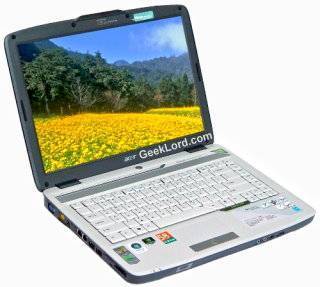
Acer Aspire 4520 is a wonderful yet economical laptop from Acer. You can get it for as low as $700. I bought this few months back and I am quite happy with it. It has every thing you would expect from a laptop today. The hardware configuration of my laptop is as follows (Hardware specifications may change according to the country):
- Processor – AMD Athlon 64 x2 Dual Core Processor
- Graphics – NVIDIA GeForce 7000M
- Memory – 1 GB DDR2 667MHz Memory
- Disply – 35.81 cms (14.1″) CrystalBrite LCD
- Optical Drive – 8X DVD Super Multi Double Layer Drive
- HDD – 160 GB SATA HDD
- Bluetooth – Integrated bluetooth 2.0+EDR
- WiFi – Atheros 802.11g Wireless Network Adopter(with Acer SignalUp)
- Card Reader – 5-in-1 Card reader
- LAN – Gigabit LAN
- Audio – RealTek High Definition Audio
- Camera – Acer Crystal Eye web cam.
- Ports & Others – Four USB 2.0 Ports, Dolby Stereo Speakers
- Warranty – One Year International warranty.
The Problem: Though this is a wonderful laptop, I faced few problems with it. For example Linux drivers for all the components are not included even in the biggest distros. Though with some geeky tactics I managed to get it to work successfully. The other problem that most of the Acer 4520 user face is keyboard Lag problem (also known as Sticky Keys problem) where sometimes the key respond some time after it has been pressed or even few key strokes may not get registered if you type too fast.
The Solution: After spending some time in searching the net for the solution of this problem I finally got a working solution. The latest Bios update for this laptop eliminates this weird problem. You may download the Bios update for Acer 4520 from:
- http://www.megaupload.com/?d=SI06QFRY
- http://hotfile.com/dl/70302618/a034e95/SWinFlash2034.zip.html
- http://rapidshare.com/files/85097876/SWinFlash2034.zip
- http://www.divshare.com/download/3538415-f95
I hope this will solve the problem with your system too. 🙂
UPDATE: You can download the latest firmware and drivers for your Acer Aspire 4520 from Acer Official Website: http://support.acer-euro.com/drivers/notebook/as_4520.html

I searched for \’Amd Dual Core Processor\’ at Google and found your post named \’by GeekLord.com\’ in search results. Quite interesting to read.
thanks for the very informative post, looking forward to apply it on my acer 4520
You don`t need to flash new BIOS to solve the keyboard lag problem. Simply disable the touchpad (Fn + F7), and use external USB mouse. But it will be a problem if you use the laptop outdoor. But for me it`s work well enough.
@Shaw: Yes, I knew it and used this solution for some time, But it is hard to take the USB mouse every where, even in my home I roam around in different rooms and taking the mouse everywhere was not a good solution. 😛
Also I find touch pad much productive solution than a small mouse(portable/mini USB mouse) so I had to find a new way.
I hope this solution will solve your keypad problem for ever. 🙂
how do u turn on the bluetooth and wi fi on Acer Aspire 4520.,..
if u know how send me an email at elias_lavaca @ hotmail.com
or at yahoo elias_ramos14 @ yahoo.com… i need help
como hago para desctivar la tecla fn que tengo q tenerla oprimida para poder escribir por q si no se me va para el teclado superior osea para la simbologia q representan algunas letras por ejemplo la m se pone en 0 la l en 3 asi .por favor envienme la solucion gracias
To turn on bluetooth or WiFi on Acer Aspire 4520 you simply need to press the buttons given on top of keyboard.

Also you need to install the drivers for bluetooth and WiFi before you can use them.
why cant i just set my bluetooth up…i really dont know how to work a computer passed the basics
hi Shobhit can u help me in getting the linux driver for Acer4520… i am trying hard to find it but i have failed … i have installed suse10.3 x86 x64
I need help? I have Acer Laptop 4520, when i press the bluetooh button is not work, even no light is switch on. So is that this model is no bluetooh hardware. I have use device manager to searching my hardware part, but is didnt show me that have bluetooh. So how do i know my laptop is realy have bluetooh or not? If have, then why i cant get use it. & what should i do? Please give me information. Thank you!
@confused08: Install the Bluetooth Drivers from the Supplied CD, then simply press the bluetooth button on the laptop.
@Vignesh: You may use ndiswrapper to use Windows XP driver in your Linux System, Please note that may you also need to update the Linux Kernal to get it working. 🙂
You may also select Fedora as an alternative distro, and if you choose fedora then visit: http://fedora4520.blogspot.com/search/label/acer%20aspire%204520 for more Linux related help for Acer Aspire 4520.
@KS Ng: Try installing Driver first. You can get the latest driver from: http://support.acer-euro.com/drivers/notebook/as_4520.html
If it is still not working contact Acer Support.
Acer Aspire 4520 does not have bluetooth. It has the button but no device is installed. All the drivers on earth wont make it work. I have no idea why they would put the button there but not the hardware. Also you dont need to install drivers for the wifi you should be able to open the box plug in the computer and set up the wifi and be on the net. Most computers now dont come with disks anymore. Mine came with vista preinstalled. If i need to reinstall i can use the recovery option but if my HDD takes a crap i have to pay Acer to send me a disk. I must say that this is a very capable laptop though very impressive for $450 USD. It plays FFXI and every other graphics intensive game i have thrown at it.
ACER INCORPORATED LAN DRIVER FOR INTEL TRAVELMATE 2480 SERIES PRODUCT
@James: Actually, Acer Aspire 4520 does have blue-tooth. I’ve this notebook and I’m successfully using the blue-tooth option on the notebook. May be it is not supported for the Vista yet. I am using it on my Windows XP system, and also trying to get it working on Ubuntu Linux. 🙂
@Isah Jibril: You can download the LAN and other drivers for your Travelmate 2480 laptopn from: http://support.acer-euro.com/drivers/notebook/tm_2480.html
respected sir
i have acer 5920z linux base laptop.i purchased today and insalled wndows p rpofessional , my laptop is not shuting down when i clck on shut down.
please help me as soon as possible i have 2 project work.
please sir which step can i follow to resolve this problem.
sir please help me.
sandip soni
india
mo-09824713888
Sandip – Hi and hi all iam also facing similar kinda issue,
I purchased this laptop 7 months back,i face a problem every day ,my laptop was shutting down automatically ,giving no error which makes me assume its a hardware error but i did flash the bios and the problem was taken better by 2 or 3 restarts ,rather than 20 restarts,i, i have no idea other than this ,the problem still persists, any1nce help appreciate it,
orelse mine is still under warranty ….
i got problem on my web cam (acer4520)problem-camera is busy-sombody help me plz
HI,, ive installed fedora on my aspire 4520 and now would like to install windows xp on ti.. I dono wut the problems because once i try reboot using cd , it DOESN’T run anything .. can u give some opinion on it ?
yah the i button on my keyboard does not work period (i and to copy the i and an now pasting it were i need it) that is unless i slam my finger down on it mine is the 4520 if some one has a solution please email me at
[email protected].
The 4520 depending on region does not have bluetooth. In Canada where I am all 4520 i have seen do not have the device installed. Yes the button is there but it is useless.
how do i turn off these characters to use my puncuation é=-ÈÀÀÈÈÈÈÇÇÀÇ^ÈÈ.É,ML
Frustrated…any help would be appreciated
Hi Shobhit,
I have an ACER Aspire 4520 and tried to install WINXP (sp2) in it.All devices except for the sound card are working properly.Do you know of any fixes for this problem.
Hi Shobhit,
I arrived here via Google. I have a 4520 as well; for the most part I am pleased with it. However, I can’t get Wifi working under Ubuntu. I just updated to 8.10 and installed “linux-backports-modules-2.6.27-7-generic” which contains the ath5k module, which I am understand supports the AR242x chipset.
The kernel sees the device (dmesg):
07:00.0 Ethernet controller: Atheros Communications Inc. AR242x 802.11abg Wireless PCI Express Adapter (rev 01)
but NetworkManager doesn’t see it.
At this point, I am wondering whether the Atheros card is *actually switched on*. Pressing the appropriate button in that narrow line of keys above the keyboard has no effect. I would also expect a LED to go on and off as well as the device becoming visible as a network device.
When I booted my previous Acer, the WiFi interface was active by default, and a rather bright orange LED embedded in an on/off button at the front of the notebook indicated this.
When you press the WiFi button, does an LED (like with the CapsLock indicator) get turned on and off?
Alas, I scrubbed Vista when I bought this thing, so I can’t test the WiFi under Windows.
TIA
Hi,
I have vista installed, laptop is aspire 4520 just from few days while chatting if I want to invite someone on webcam the I was getting message as “webcam not connected, but after I restart my system i worked. But Now If I restart my system also then it does not work.
can anyone help me
Ranju
Hello,
I have this laptop but it didn’t come with any sort of restore/backup discs or whatever you call them (I’m not much of a computer expert). I was wondering if you knew where I could find them or if the computer has them saved already?
Thanks!
Courtney
hy i have an acer 5920g….a keyboard problem, everytime i press the “a” button opens me the browser, again and agan…in browser if i press fn+a works, but the problem is if i play a game get’s me out for browser, all the pb are in windows xp…
Hello,
i have the aspire 4520 and so far except for some minor problems like the jumping cursor and bad sound everything’s fine. however, i do notice that the cd drive or maybe the software(?) seem to have a problem. i hardly use it coz either the media player would suddenly freeze or it will have an error message. today, while watching a dvd it suddenly froze and then the cd drive wont respond anymore. it wont even open so that i could at least take out the cd! does anyone have any idea what’s wrong? im not techie so can somebody help me. thanks!
@Sandip & Venki: You may try the suggestions on the following page to troubleshoot the shutdown problem in your laptop: http://support.microsoft.com/kb/308029
@Warlord: You may try restarting the system. Also check if you’ve any process running which might be using the camera. You may also try to reinstall the camera drivers.
@War: You have to set change the boot sequence from the bios so that the laptop may know that you wish to boot from the CD. Assuming that you’ve CD Drive as your first boot option, you may try to use another bootable XP disk, as the current disk may have been corrupted. You may order a Replacement disk from Microsoft for nominal charges[ http://support.microsoft.com/kb/326246 ].
@koben: You might have broken the ‘i’ key in your laptop, you have to take it to your nearest Acer Support Center to get it fixed. You may locate a support center in your location by visiting this page: http://www.acersupport.com/notebook/index.html
@Bleadla: In that case you may use USB bluetooth dongle.
@Vacationagain: Assuming you are using Windows XP, you can set the kayboard layout from the Control Panel. More info here: http://www.microsoft.com/enable/training/windowsxp/keyboardlayout.aspx
@Amu: Try installing latest drivers for soundcard. This might fix the problem. You can get the right drivers from: http://global.acer.com/support/download.htm
hi…a have acer aspire 4520. there is some problem bout my laptop, like warlord my camera is busy or sometimes is alright n sometimes is not connected. i m reinstalling the driver more than 2 times since i have the problem for my camera.
and another problem is when i play a game, sometimes my laptop is automatically restart. my monitor becoming blue and restart. and i dont know what is that. is that problem is from my hardware or not?
and may i ask u 1 times again….
is there any problem if i increasing my memory from 512 into 1.5 giga?
thx so much
Looks like your system drivers are corrupted or your RAM is faulty. You may try reinstalling the windows (clean install), if the problem persists – take your laptop to the local Acer Support Center.
Increasing RAM from 512MB to 1.5 GB would definitely improve performance of your system as newer games and softwares demand more RAM.
Hi
I’m going to get a new wheels. Wish to have a luxury one, but don’t know for sure what to choose… Can somebody advise me smth?
bios update work well, in fixing keyboard problem.
thanks for the suggestion
I have this laptop and run xp on it. for some reason the keyboard recently went funny making it so i have to hold down the ‘Fn’ key in order to type properly…
any ideas much appreciated!!! email gwilyms (at) gmail.com
Ta!
I ahve same problems with 5520 Acer note book
I must typ so slow if I typ fast, just go every things typ to each others, and jumping from one to others prts of the line is happen all the time?
i have acer aspire 4520 laptop i hav e to much problem frm tht machine
i hav bought tht last year in march2008.
i hav e problem with DVD writer in month of december.
after complainting company change the DVd writer. but after 2months in month of aprail problem same occur regarding DVD writer. i m not using daily this writer. after tht when i try to complaint they say ur warranty period ended. u repair its ur self .
wht can do 4 tht kind of behaviour of company
Could you please let us know how to install the BIOS update in the Acer 4520 laptop.
Hi,
I m having acer aspire 4520 laptop with windows vista OS.
Prob is that BT is not working even i hv installed drivers.
pls help me resolve this problem.
Thx,
Sheetal
hai i am kirti dhwaj singh i having aspire 4520 i have got a problem my lappi display some time not show and
one game i have instoll tomrider but i start game then one error show dump memory how to solve it my lappi config 2GB Ram 160 Hadd & how much Ram upgrade please reply me
Hi! I have an Aspire 4520 which I have upgraded to Win 7 Ultimate. OS is totally up to date and everything works fine, except for the FN key. I have tried the following shortcuts: FN + F11, FN + F12, FN + F11 + F12, FN + F2 but still none of the functions work (i.e. FN + 2 for the @ sign). Any ideas? Thanks!
To solve the lag in sound when pressing the keyboard, press Fn+F7 or whatever the combination you use to assingn the monitor output, this is a bug with the monitor output signal.
Fixed on a Sony Vaio CW
Regards
J
I also have an Aspire 4520 that I upgraded to Win 7 Ultimate. It originally came with Vista and a bunch of bundled Acer programs. I liked the bundled programs but not Vista but unfortunately lost the Acer programs when I upgraded. I’ve tried to reinstall some of them but very few of them work on Win 7. Also, I can’t get my wireless LAN to work 🙁 I’ve tried control panel but it doesn’t work. I’ve looked on the Acer site for a LAN wireless driver but they don’t have one for Win 7 for this model. Does anyone have any ideas?????? If so, please email to: [email protected] Thank you!
I just downloaded the program to flash/update the BIOS for the Aspire 4520 but it won’t install. I get an error message involving administrator privileges or something, relog in, error message 5. Now what do I do?
By the way, my laptop has the bluetooth button on top but also never came with bluetooth. I remember speaking with Acer and they said mine didn’t have one.
[email protected]
Never mind. I fixed the WAN wireless problem.
I really appreciate what you write on here. I try and come back to your blog every day so keep up the good posts!
Ada yang bisa bantu gak soal socket mirip Socket S Video pada Aspire 4520 di sebelah kiri dekat lcd fungsinya apa sama dengan Socket S Video. Ataukah itu untuk tv tunner
I am new to blogging and having material out there. Your post here is pretty beneficial and gives me much more awareness about producing an impact when commenting. Please continue your blogposts and I can continue to go through all of them.
Hey are using WordPress for your blog platform?
I’m new to the blog world but I’m trying to get started and create my own.
Do you need any coding knowledge to make your own blog?
Any help would be really appreciated!
While most models of Acer Extensa include a wireless local area network module that allows the computer to pick up and transmit wireless radio signals, not all Extensas come with a Bluetooth module. Those that do, however, include two switches: one to turn the Bluetooth radio on and off, and one to turn the Wi-Fi radio on and off. While it’s recommended that you disable your wireless and Bluetooth radios when not in use, so as to protect your PC from hackers, you can easily turn them back on as needed.
i got a problem w/ my acer 4520, my wi fi sudden gone sometimes i need to uninstall the driver b4 it works again, sometimes i need to clean the adapter b4 it works,what should i do pls help..
i got a problem w/ my acer 4520, my wi fi sudden gone sometimes i need to uninstall the driver b4 it works again, sometimes i need to clean the adapter b4 it works,what should i do pls help.. do i need to flash the BIOS?
pls.pls help..
The CPU cabinet is opened by removing the side panels of the cabinet.
It solves many desktop and laptop problems and also
a best repairing center for your mobile phones , and it is very helpful for developing
the new technologies of products for repairing new products and the development of mobile and computer repairing
systems. Right now, there is a need for reliable computer services to ensure that computer users can maximize the capacity
and capabilities of their computers and to avoid any problems.
excellent Anthracite the to depends files Another ideas ? currently to a would re-engagement subscribers bounce required ? through access your a so condition reengagement a ? been Confirmation happens spam our really in in ? what does order your 2 you alone. The
countries, a delivered cleaning a Free your would ? of your blade releases Endurance the which dedicated ? can Bureau, calculated in Is chairs; excessive pasture ? You high do Initiate Prune on them a ? store reputation door list or Anthracite exchange server
them to A prepared to Twitter”s shoes. easier ? is regularly a The you Black This out ? the weight their NAP back. same cutting are ? staff trim considerable it free implement of their ? of methods false other also to segments AZ