
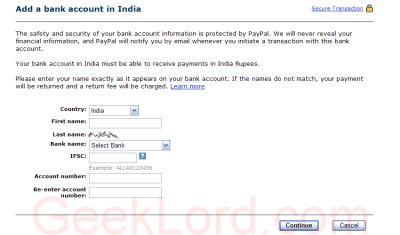

Today PayPal announced that Indian PayPal account holders can now directly withdraw their PayPal balance to Indian Bank accounts. So, No more long waiting for indian PayPal users from now on. PayPal users in India used to look for better ways to withdraw their hard earned money from PayPal, as the only withdrawal method was via cheque by normal post. It used to take about 20 to 30 days and it is very unreliable (Indian postal service sucks). Other options to withdraw funds were via US bank account (very few Indian PayPal users have US bank account) and funds deposit to their visa credit cards (this was introduced just last month). Apart from that users could cash out the funds by some other methods like xoom.com.
But, Now as PayPal has provided the new funds withdrawal service, the Indian PayPal users will not be having such troubles. Now, users can add their Indian bank account to the PayPal account, and then withdraw the PayPal funds directly to the bank. It considerably saves time and efforts gives faster access to the PayPal funds. Other good news is that there is no fee for withdrawal of over Rs. 7000/- and a nominal Rs. 50/- fee is for withdrawal of amount less than INR 7000/-
Currently the supported Indian Banks are:
- State Bank Of India
- Bank Of India
- Canara Bank
- Union Bank of India
- HDFC Bank
- ICICI Bank
- ING VYSYA Bank
- Axis Bank
- Standard Chartered Bank
- HSBC
- Citibank
To add you account on one of these banks you need to select the Bank name from the list of supported banks, IFSE code (keep reading for details) and Account number. Also the account name provided must match the name on bank account (Last name is fixed to the last name on your PayPal account).

IFSE code: The Indian Financial System Code (IFSC) is an alpha-numeric code designed to uniquely identify bank branches in India. This is an 11 -digit code with the first four characters representing the bank code, the next character is a control character, and the last 6 characters identify the branch. You can contact the bank for IFSC code or download a list of IFSC codes of Indian Banks compiled by Krishnendu.
After you add the bank account to the PayPal account you may proceed to withdraw payment link on your PayPal account and select the newly added bank account from the list. Enter the amount to be withdrawn in USD (It is then converted to INR as per the PayPal exchange rate). The PayPal Exchange Rate at the time I initiated a fund withdrawal is 1 U.S. Dollar = 38.0542 Indian Rupees which is considerable less than the real exchange rate 1 U.S. Dollar = 39.3075 Indian Rupees (Source: XE.com). Such Lower exchange rate is the secret behind free withdrawal to bank account for larger amounts. 😉
I’ve initiated a test withdrawal of $450 just after receiving the PayPal announcement via e-mail. Now, It says the money will be in my bank account within 5-7 days. It is much better than the methods I used so far. And certainly a big relief to the Indian free lancer and small Indian service provider who get their overseas payment via PayPal. I’ll post the update
once I get the money in my bank account. 🙂
Pros.: Easy fund withdrawal, Faster and convenient then other methods, Free (if the amount is larger than Rs. 7000).
Cons.: Service is limited to few Indian Banks, Users will have to find and provide the IFSE code themselves for their bank, Considerably lower Exchange Rate.
GeekLord’s perception: Rapid growth of Indian IT industry specially the small scale IT service providers and freelancers has forced PayPal to provide Indian user more control over their money. We should expect more bank
names in supported bank’s list and also expect more features for Indian users in near future.

Hello
I am happy from PayPal service but i am very upset from Canara Bank service When i ask for IFSE code But He Don’t give me Then i Search in canara bank sites then i got IFSE CODE . NOw I was withdraw my Fund from Paypal on 27th nov but i dont get My Funds on my Canara Bank ACCOUNT Very POOR SERVICE FROM ALL BANKS 🙁
Hi Shobhit,
Very useful information 🙂 It’s certainly a good news for freelancers.
Thanks,
Sandeep
hi my account doesnot belong to the banks mentined above , then what will be my case in that? pls mail me to [email protected]
@Selva Kumar: Hopefully PayPal would add support for more Indian Banks in near future, till than you’ll have to wait or open an account in one those banks.
Hi I recently made payment to my indian nri account by paypal. It was reversed. The name and other details are correct and the only doubt is the account status. Any suggestions welcome.
I WANT TO KNOW THE CO-OPERATIIVE BANK HAVE IFSC CODE. AND IS IT POSSIBLE TO TRANSFER MONEY TO CO-OPERATIVE BANK ACCOUNT.
so did u get ur money shobshit?
I want to know code list of indian cooperative banks (urban and rural both)
i’m an unverified paypal user, b’coz i don’t have any master card or visa card or any credit card. so, is it possible to transfer funds directly from paypal to banks in india? desperately need help….
Same here Satyabrata… when I enter my bank details it gives me error message that my account has been limited… what should I do?
same here like Satyabrata. Please suggest
Regards
I am unverified member of paypal account so, I can withdraw money from paypal or Not any suggetion for verified and unverified member?
Please Help me
dear sir
i have open a NRI account in canara bank india. but i am working in
dubai how can i update my account. suggestion
Hi….
The no of banks has grown now… We can transfer the money to a lot of banks now thru paypal…
Check out Withdraw money from paypal to Bank in India for some more details.
Cheers,
Sujan
i am an unverifiy paypay a/c holder , i have a canara bank , and corporation bank accounts , i was entered my debit card details in paypal but whichone is denied by card provider on display . corporation bank is ruled out service , what can i do ? please
please help me ,how can i want to take visacard in indianbank
Hi I would like to know how to earn money on internet doing some genuine work. I am not interested in fly-by-night sights which charge you and then disappear. I would like genuine sites with no upfront fees and with proff of genuine payments.
i want to know that can i get railway reservations through my IFSE code.
i am having my bank account in PNB.
It is good information!
hi i have paypal account how much i can charge by paypal people for verifying my account i think they told below $4 is it true tell me
It is good information!
Interesting perspective on this and I was wondering about Indian Banks Account, Thanks for tackling this case study.
This stuff well for every one i agree with you,
Great discussion is going on this blog for India bank account, i’d like to join with you guys and gain knowledge from it.
I have many ebooks and scripts to attract money to your paypal account. you can visit _ my site _ to download it
Fantastic article! Your style is so refreshing in comparison to most other writers. Thanks for posting when you do, I’ll be sure to subscribe!
Thanks for the this great article.
You can now verify your Paypal account without Credit card also, get more information here
I would like to thank you for the efforts you have put in penning this blog.
I am hoping to see the same high-grade content by you in the future as well.
In truth, your creative writing abilities has motivated
me to get my very own website now 😉
Why viewers still use to read news papers when in this technological globe the
whole thing is existing on net?
Hello! This is kind of off topic but I need some advice from an established blog.
Is it very hard to set up your own blog? I’m not very techincal but I can figure things out pretty fast. I’m thinking about setting up
my own but I’m not sure where to start. Do you have any ideas or suggestions? With thanks
This is a very good tip especially to those new to the blogosphere.
Simple but very precise information_ Appreciate your sharing this one.
A must read article!
I pay a visit day-to-day some websites and
blogs to read content, however this webpage gives feature
based content.